
Managing Google Ads for e-commerce stores requires continuous optimization of campaign structures to prevent budget waste and maximize Return on Ad Spend (ROAS). In 2026, as Google’s machine learning algorithms become more sophisticated, store owners face a critical decision: should you maintain the granular control of traditional setups, or hand over the reins to automation? Our latest performance max vs standard shopping comparison helps you navigate this choice and determine which strategy aligns best with your specific store goals.
Recent benchmarks across thousands of e-commerce brands show that shifting between these formats without a clear strategy can result in losing up to 40% of the monthly budget due to auction overlap. This is why conducting a thorough performance max vs standard shopping comparison is vital to uncover which model actually aligns with your specific product margins. This analysis breaks down the technical differences between these two powerful campaign types to help determine the most profitable path for your store’s growth.
Technical Infrastructure: Understanding the Core Differences
Before diving into a detailed performance max vs standard shopping comparison, it is essential to understand the underlying architecture of each campaign type. While Google continues to prioritize automation, traditional models remain highly relevant depending on account maturity and data availability.
1. Standard Shopping Campaigns
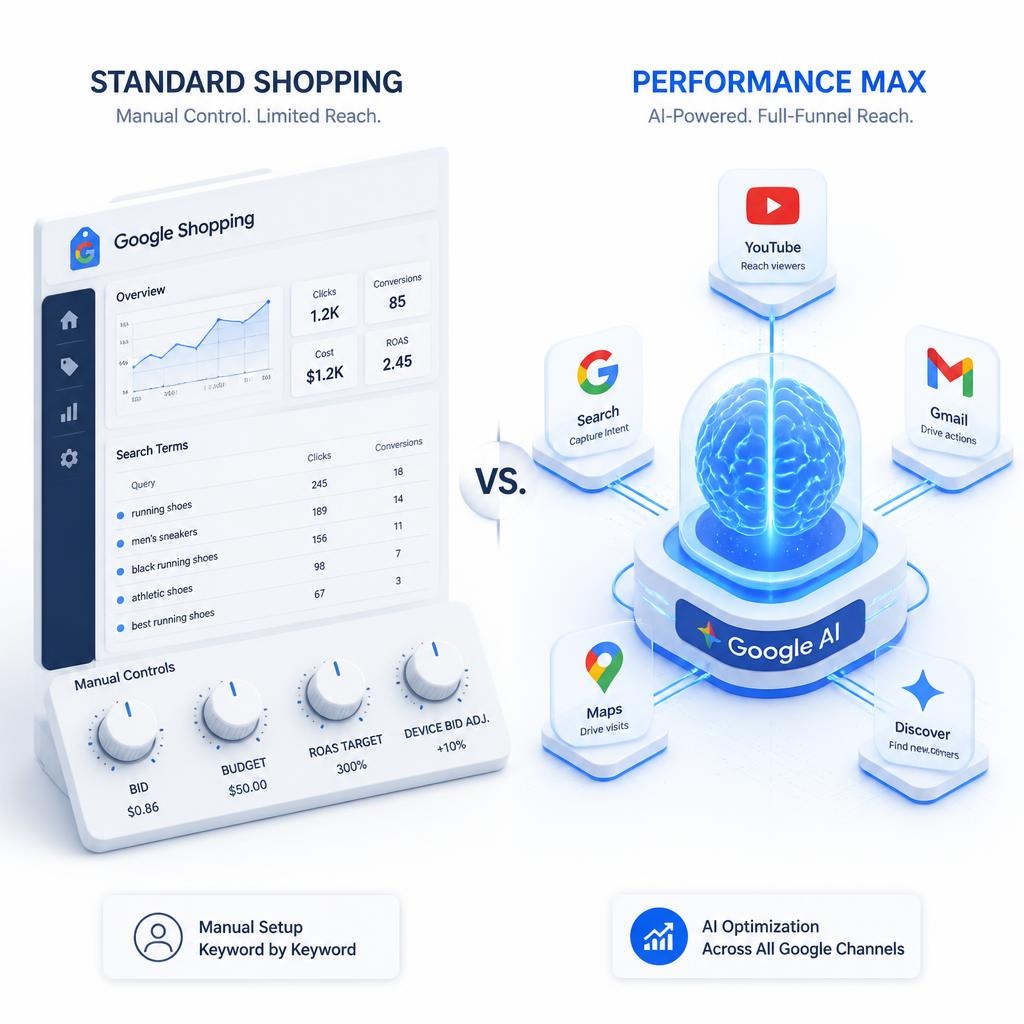
This is the classic, product-feed-driven format for e-commerce. Data is pulled directly from the Google Merchant Center feed, and ads are displayed exclusively on the Shopping tab and Search results. This format provides absolute transparency and manual control over search terms, negative keywords, and product-level bids (Manual CPC).
2. Performance Max Campaigns
Commonly referred to as PMax, performance max campaigns represent a goal-based, fully automated upgrade. The defining feature of performance max campaigns is their ability to serve ads across Google’s entire ecosystem—including Shopping, Search, YouTube, Display, Discover, Gmail, and Google Maps—all from a single campaign. By leveraging machine learning and audience signals, the system dynamically tests combinations of text, image, and video assets to maximize conversions.
Detailed Performance Max vs Standard Shopping
Choosing the right format requires weighing key operational factors against your business objectives. Reviewing a direct table provides a clear breakdown of this technical matchup:
| Feature / Factor | Performance Max Campaigns | Standard Shopping |
| Ad Placements | All Google networks (Search, YouTube, Display, etc.) | Search results and the Shopping tab only |
| Keyword Control | Limited (via account-level negatives & Search Themes) | Absolute control over negative and positive terms |
| Minimum Data Required | High (minimum 30–50 conversions per month) | Zero (ideal for brand new ad accounts) |
| Creative Assets Need | High (requires videos, lifestyle images, headlines) | Zero (relies entirely on structured feed data) |
| Volume Scaling Potential | Very High (unlocks upper-funnel and passive audiences) | Capped by daily user search volume |
When to Deploy Performance Max Campaigns
Utilizing performance max campaigns as your primary driving force is highly effective for breaking through revenue ceilings, but the system is inherently data-hungry. Launching a PMax setup yields the highest efficiency when the following criteria are met:
- High Conversion Volume: The account must consistently generate at least 30 to 50 conversions over a 30-day window. Without this baseline, Smart Bidding lacks the data necessary to optimize effectively.
- Flawless Conversion Tracking: Because the algorithm optimizes for conversion values, any breakages or inaccuracies in tracking tags will cause the AI to misallocate budget rapidly.
- Rich Creative Assets: To unlock the full potential of PMax, high-quality video content and lifestyle imagery are mandatory. Relying on auto-generated assets often degrades brand image and conversion rates.
If your ad account ticks all these boxes, ensuring an optimal infrastructure is the next step. Reviewing a technical breakdown on How to Do Google Ads Performance Max Setup can prevent common structural mistakes during the initial launch phase.
When Standard Shopping Remains the Superior Choice
Despite Google’s aggressive push toward automated solutions, traditional shopping campaigns still offer superior financial safety and stability in several scenarios:
- New Accounts and Product Launches: If an e-commerce store is newly established and lacks a conversion history, starting with Google Shopping Ads is the safest way to gather baseline market data with minimal risk.
- Limited Budgets (Under $2,000/Month): Low budgets do not provide enough runway for the algorithm’s learning phase. Automated campaigns may spend a large percentage testing placements on YouTube or the Display Network, starving the high-intent shopping placements.
The Hybrid Strategy: Dual Setup Without Internal Competition
Advanced media buying structures do not pit these two campaign types against each other; instead, they utilize them as complementary forces. According to Google’s auction hierarchy, if the same product is active in both types simultaneously, PMax will always take precedence, effectively pausing the Standard Shopping campaign.
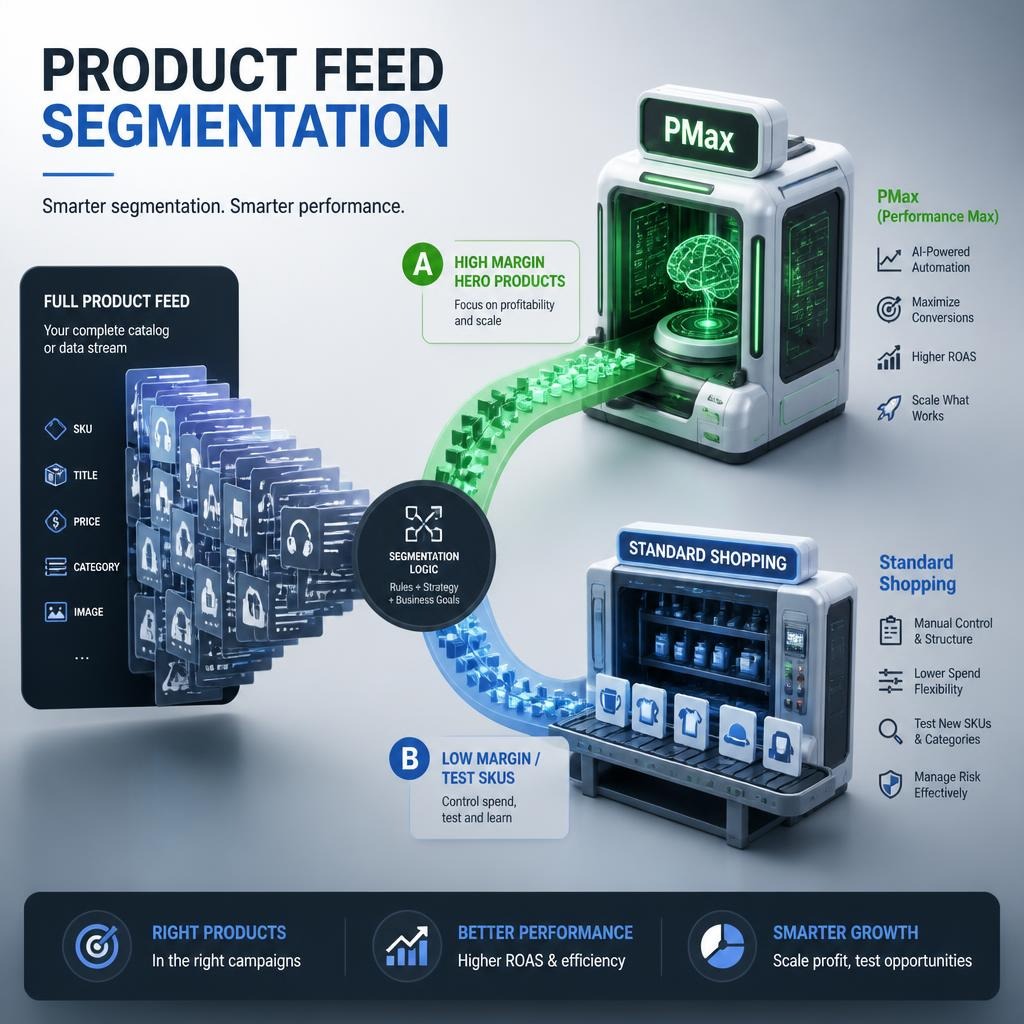
To bypass this conflict and run a dual setup cleanly, implement a Feed Segmentation strategy:
- Segment by Margin and Performance: Push your top 20% high-margin, high-performing products (Hero SKUs) into performance max campaigns to scale their volume using multi-channel placements and audience signals.
- Revive Underperforming Products (Zombie SKUs): Products that receive zero impressions or clicks within PMax due to algorithmic bias should be excluded from the PMax asset groups. Move these into a High Priority Standard Shopping campaign with Manual CPC to force visibility.
- Isolate Brand Traffic Exclusively: To evaluate true performance, exclude your brand keywords from PMax. Automated campaigns tend to prioritize warm brand traffic to inflate their reported ROAS artificially. Keep brand terms isolated within a dedicated Search campaign.
Conclusion: Which One Wins?
The definitive answer to Which One Wins? depends entirely on account data maturity and monthly budget scale. Any practical proves that there is no one-size-fits-all answer.
For established stores with high conversion volumes, stable budgets, and the capacity to produce creative video assets, Performance Max wins by expanding market reach and finding customers across hidden touchpoints. However, for startups, low-budget accounts, or businesses prioritizing strict margin protection and keyword transparency, Standard Shopping wins by remaining the most reliable, predictable tool for e-commerce stability.
Frequently Asked Questions (FAQ)
Is Performance Max officially replacing Standard Shopping?
No, Google has not announced a sunset date for Standard Shopping. However, almost all ongoing engineering, new features, and algorithmic updates from Google are dedicated exclusively to Performance Max, making it the modern default.
Can I run a Performance Max campaign without a video asset?
Yes, you can create a “Feed-Only” PMax campaign by leaving the asset groups blank except for the product feed. However, if you add text or headlines without a video, Google will auto-generate a video using your images. These auto-generated videos are notoriously low-quality, so providing an explicit video asset is highly recommended for full asset groups.
How long is the learning phase for automated campaigns?
Performance Max typically requires 2 to 4 weeks to stabilize its learning phase. It is common to see performance fluctuations or a temporary dip in ROAS during the first 14 days while the machine learning model tests different placements and audiences.
How do I stop PMax and Standard Shopping from bidding against each other?
You must ensure they do not contain the same products. Use custom labels in the Google Merchant Center to split your inventory cleanly so that a specific SKU is only present in one campaign type at a time.