
A product team launches a new finance app and celebrates a low cost per install. Four weeks later, most new users never completed identity verification. The media report looks healthy, but the business result does not.
That gap is why a google app campaigns setup guide must begin with the valuable action after the download—not with the campaign creation screen. One campaign may need to build an initial user base, another may need to bring inactive users back, and a third may need to create demand before release. Treating those objectives as one problem usually produces inexpensive activity rather than useful growth.
Whether you manage in-house or with a Google Ads agency, the sequence stays the same: define the valuable event, prove it is measurable, then choose the right campaign subtype.
What the Campaign Type Actually Controls
App campaigns can distribute ads across Google Search, Google Play, YouTube, Discover, the Display Network, and other eligible inventory. Advertisers provide goals, bidding inputs, markets, and creative assets; Google assembles combinations across suitable placements.
The platform separates the format into three subtypes: installs, engagement, and pre-registration. Each matches a different user state. Selecting the subtype should be a product-growth decision, not merely a menu choice.
Prepare Measurement Before Opening the Campaign Builder
Do not launch until you can measure first opens and the in-app events that represent real value. Google Ads supports app conversion imports from Firebase or Google Analytics, Google Play, and supported third-party providers.
For google app campaigns, the conversion event is the instruction given to automated bidding. An ecommerce app may care about a first purchase; a banking app about completed verification; a subscription product about a paid trial. Optimizing all three toward installation alone tells the system every downloader is equally valuable. Clean account infrastructure—including setups where teams rent google ads account environments with verified event imports—makes that instruction trustworthy.
Choose the Campaign Type From the User State
Install Campaigns: Build the Right User Base
Use install campaigns when the app needs new users. Setup can prioritize install volume or a selected in-app action. A reliable google app campaigns setup guide does not judge success by CPI alone—track activation, registration, purchase rate, trial starts, and early retention.
Once behavioral data exists, optimize toward events that predict commercial value. Optimizing a shallow event because it produces more conversions can teach the system to find users who download easily but contribute little.
Engagement Campaigns: Bring Existing Users Back
Engagement campaigns target people who already installed the app and should return to complete a specific action. Google currently requires an eligible app with at least 50,000 installs, an app-user audience, mobile conversion tracking, and a functioning deep-link method.
A useful deep link should open the product, offer, unfinished booking, renewal screen, or feature named in the ad—not just the homepage. Separate abandoned registrations, dormant subscribers, and previous purchasers into different messages and destinations.
Pre-Registration Campaigns: Build Demand Before Release
Pre-registration is for an Android app or game enabled for pre-registration in Google Play Console. Google requires the package on a release track and a launch within 90 days after pre-registration becomes available.
Coordinate creative and targeting with the launch calendar. Judge success beyond registrations—later review installs, onboarding completion, retention, and the first commercially meaningful event. This is the same lifecycle thinking a strong google ads agency dubai applies before scaling spend.
Build the Campaign in a Controlled Sequence
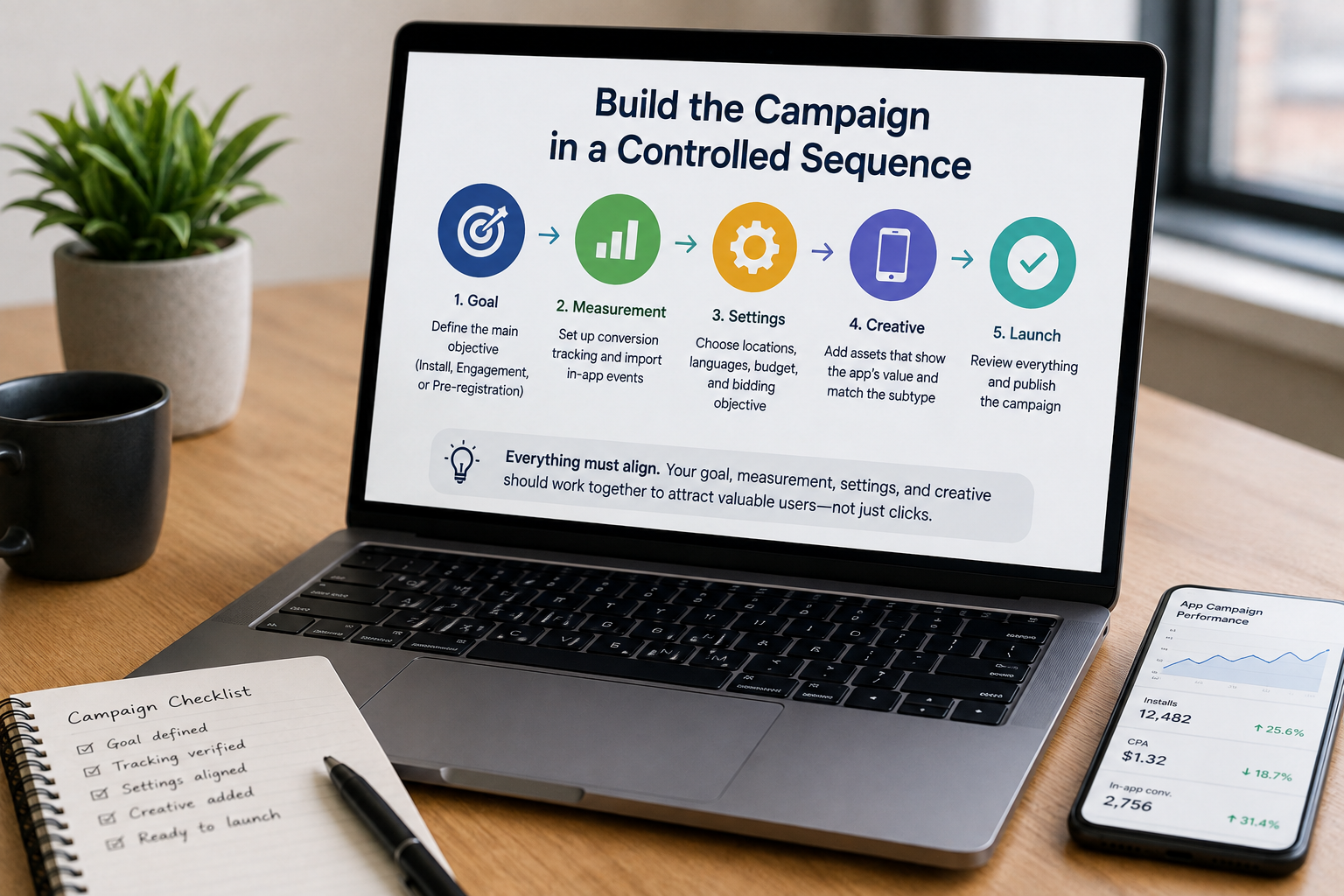
Once measurement and subtype are settled: create the campaign, choose App promotion, select the app and subtype, define locations and languages, set budget and bidding, and add the conversion action that matches the campaign’s role. Goal first, measurement second, settings third, creative last.
During early learning, avoid changing budget, bidding, geography, and conversion goal at the same time. The bid should reflect event value—product margin, LTV, refunds, and retention should inform that calculation.
Supply Creative for Different Placements
Provide a varied mix of text, images, and video. Strong asset sets include a clear value proposition, an in-app demonstration, a recognizable interface, and a CTA matched to subtype. Communicate value in the opening seconds and prepare vertical, square, and landscape versions.
Launch, Diagnose, and Improve
Install campaigns need post-install quality; engagement campaigns need incremental in-app actions; pre-registration campaigns need launch conversion and early retention. Compare advertising reports with product analytics before reacting.
Ongoing Google Ads management from an experienced Adwords agency becomes valuable when campaign data must be reconciled with app analytics, creative testing, release schedules, and commercial targets. Training resources like Coursera’s Mobile Marketing course provide context, but decisions should still follow your app’s own economics.
Final Takeaway
The best google app campaigns setup guide is a sequence of decisions: define the valuable user action, prove the event is measurable, choose the subtype that matches the user state, connect the right destination, provide creative variety, and evaluate quality beyond the first conversion.
Frequently Asked Questions
What are the three Google App Campaign subtypes?
Install campaigns acquire new users, engagement campaigns bring existing users back to a specific action, and pre-registration campaigns build demand for Android apps before release.
Should Google App Campaigns optimize for installs or in-app actions?
It depends on the product stage. Early launches may need install volume to create a base, but once enough data exists, optimize toward events that predict purchases, subscriptions, bookings, or retention.
What are Google’s requirements for engagement campaigns?
Google currently requires an eligible app with at least 50,000 installs, an app-user audience, mobile conversion tracking, and a functioning deep-link method.
How should pre-registration success be measured?
Look beyond registration counts. After launch, review how many registered users installed, completed onboarding, stayed active, and reached the first commercially meaningful event.