
Looking for a practical technical google ads audit checklist you can run on a live account? This guide breaks down the exact technical review we use to catch broken tracking, wasted spend, and structural mistakes before they quietly burn another month of budget.
Table of Contents
Two years ago, a client sat down for a discovery call convinced her account was cursed. Leads had dried up overnight, cost per lead had tripled, and nobody on her team could explain why. She’d already cycled through two agencies before us, and both had recommended the same fix: raise the budget and wait it out. Twenty minutes into the account, the real answer was sitting in plain sight. A conversion action had quietly stopped firing three weeks earlier, right after a routine website update. The campaigns hadn’t actually gotten worse. Google’s bidding algorithm was simply optimizing toward conversions that no longer existed, spending confidently against data that had gone stale weeks ago. Nobody caught it because nobody was looking closely enough at the plumbing underneath the dashboard. That’s the moment I stopped treating audits as paperwork and started treating them as the single most valuable hour an advertiser can spend on their account.

What a Google Ads Audit Actually Uncovers
A Google Ads Audit is not a report you skim once and forget in a folder. Done properly, it digs into tracking, structure, and spend until it finds the leak nobody’s mentioning in your weekly stand-up. When we run one for a new client at Admoon, we’re not ticking boxes, we’re rebuilding trust in the numbers the account is reporting back to leadership. Every review we’ve done has surfaced at least one issue the client didn’t know existed, whether that’s a broken tag, a wasted budget pocket, or two campaigns quietly bidding against each other. Skipping it is the fastest way to keep paying for clicks that were never going to convert in the first place. We’ve watched a single review pay for itself ten times over in one month simply by exposing where the budget was actually going. It isn’t optional once real money is on the line, it’s the checkpoint that tells you whether the account is healthy or just busy.
Your Technical Google Ads Audit Checklist

Here’s the technical google ads audit checklist we actually use on client accounts, not a template pulled off a listicle. It covers four areas that quietly destroy performance long before anyone notices in the dashboard: tracking, structure, budget signals, and landing pages. We update it every time Google rolls out a new feature or sunsets an old one, because a stale checklist is nearly as dangerous as never auditing at all. If you bookmark nothing else from this article, bookmark this technical google ads audit checklist.
Conversion Tracking Health
- Confirm every conversion action is firing correctly, not just showing “recording conversions” as a status
- Check for duplicate conversions inflating your reported numbers
- Verify enhanced conversions and any offline conversion imports are mapped to the right actions
Account Structure & Campaign Settings
- Check that campaign types (Search, PMax, Demand Gen) actually match the business goal, not just habit
- Look for overlapping keywords quietly cannibalizing each other’s impression share
- Confirm location and language targeting still reflects where your real customers are
Budget & Bidding Signals
- Compare bid strategy performance against account maturity and conversion volume, not just last week’s numbers
- Flag campaigns that are budget-capped and silently losing impression share
- Review shared budgets versus individual campaign budgets for hidden imbalances
Landing Page & Quality Score Factors
- Test mobile page load speed, since slow pages quietly tax your Quality Score
- Confirm message match between the ad copy and the landing page headline
- Check for broken destination URLs or unnecessary redirect chains
Common Mistakes We Find on Audit Day
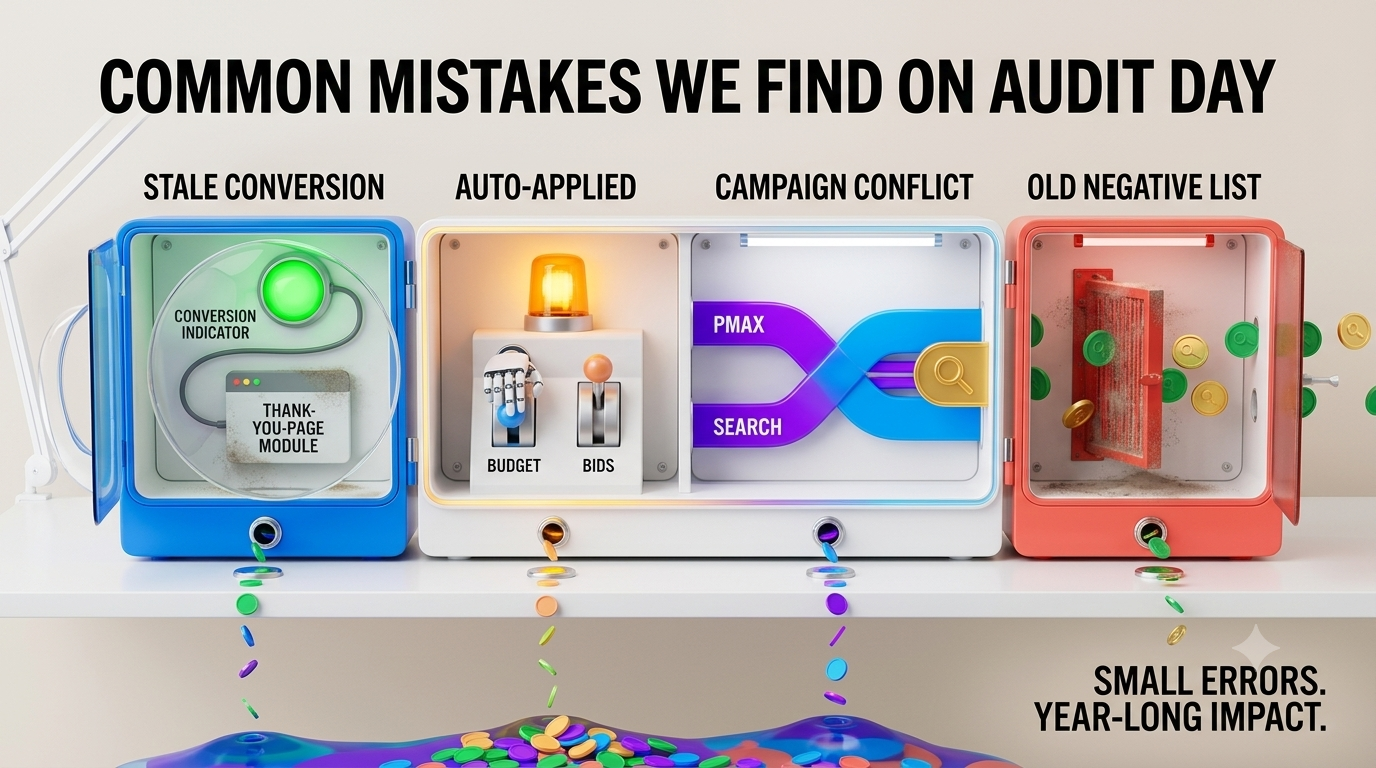
After running enough of these, patterns start repeating across otherwise unrelated accounts. The most common one is a conversion action left active long after the underlying event stopped meaning anything, like a “contact form submit” still firing on a thank-you page nobody sends traffic to anymore. Close behind that is auto-applied recommendations quietly accepted by default, adjusting budgets or bids in ways nobody on the team actually approved or even noticed. We also regularly find PMax campaigns competing directly against Search campaigns for the same high-intent queries, splitting budget and impression share between two campaigns that should be working together instead of against each other. And almost every account has at least one negative keyword list that hasn’t been touched since the day it was created, quietly blocking traffic that would convert today even though excluding it made sense two years ago. None of these mistakes look dramatic in isolation. Stacked together across a full year of spend, they’re usually the difference between an account that scales predictably and one that just treads water no matter how much budget gets thrown at it.
How Often Should You Run a Technical Google Ads Audit?
Quarterly is the minimum for any account spending meaningfully. Beyond that, run one immediately after a website migration, a tracking overhaul, or a sudden, unexplained shift in cost per lead. A google ads audit is a snapshot, not a subscription, which is exactly why it needs to be paired with ongoing maintenance. That’s the piece most advertisers skip, and it’s covered in our Google Ads Optimization process, where the fixes an audit uncovers actually get implemented and monitored instead of sitting in a PDF nobody reopens.
Turning Audit Findings Into Action
Finding the problem is only half the job. We’ve sat across from advertisers holding a beautifully formatted audit document, three months old, none of it actioned. The tag was still broken. The overlapping keywords were still fighting each other. A checklist only earns its place once someone actually works through it line by line, which is where a proper tune-up cycle matters more than the audit itself. For the tracking side specifically, Google’s own documentation on setting up conversion tracking is worth keeping open in a tab while you work through the checklist, since Google updates the setup requirements more often than most advertisers realize. If you’re still building your foundation in Google Ads, fixing tracking first will save you from optimizing against bad data later.
Frequently Asked Questions
What’s the difference between a Google Ads audit and a technical audit?
A general audit often looks at strategy and messaging. A technical audit goes underneath that, into tracking accuracy, account structure, and settings that quietly shape every result above them.
How long does a technical google ads audit checklist take to run?
For a single-market account, expect two to four hours done properly. Multi-market or multi-brand accounts take longer, mostly because tracking issues tend to hide in the campaigns nobody’s checked in months, and each additional conversion source or feed adds another place for something to have quietly broken.
Can I run this audit myself?
Yes, if you’re comfortable in Google Tag Manager and GA4. The harder part isn’t access, it’s knowing which anomalies are actually worth fixing versus normal account noise.
Final Thoughts
Most accounts aren’t underperforming because of bad ideas. They’re underperforming because something small broke quietly, months ago, and nobody went looking. It’s rarely the strategy that’s wrong—it’s the foundation underneath it that nobody has checked.
Run the checklist. Trust what it tells you, even when the finding is small and unglamorous. And if the account has been running untouched for a while, that’s usually the strongest sign it’s overdue.
A technical audit tells you what needs fixing. A proper Google Ads Optimization cycle is what turns those findings into measurable improvements. Once the hidden issues are corrected, your campaigns can spend more efficiently, generate cleaner data, and give Google’s machine learning the signals it needs to perform at its best.